Skylight Calendar alternatives: an honest comparison
What a Skylight Calendar really costs in 2026, what you get for it, and five alternatives (from a free shared calendar on an old tablet to Hearth and the Echo Show 15), with who each one is right for.
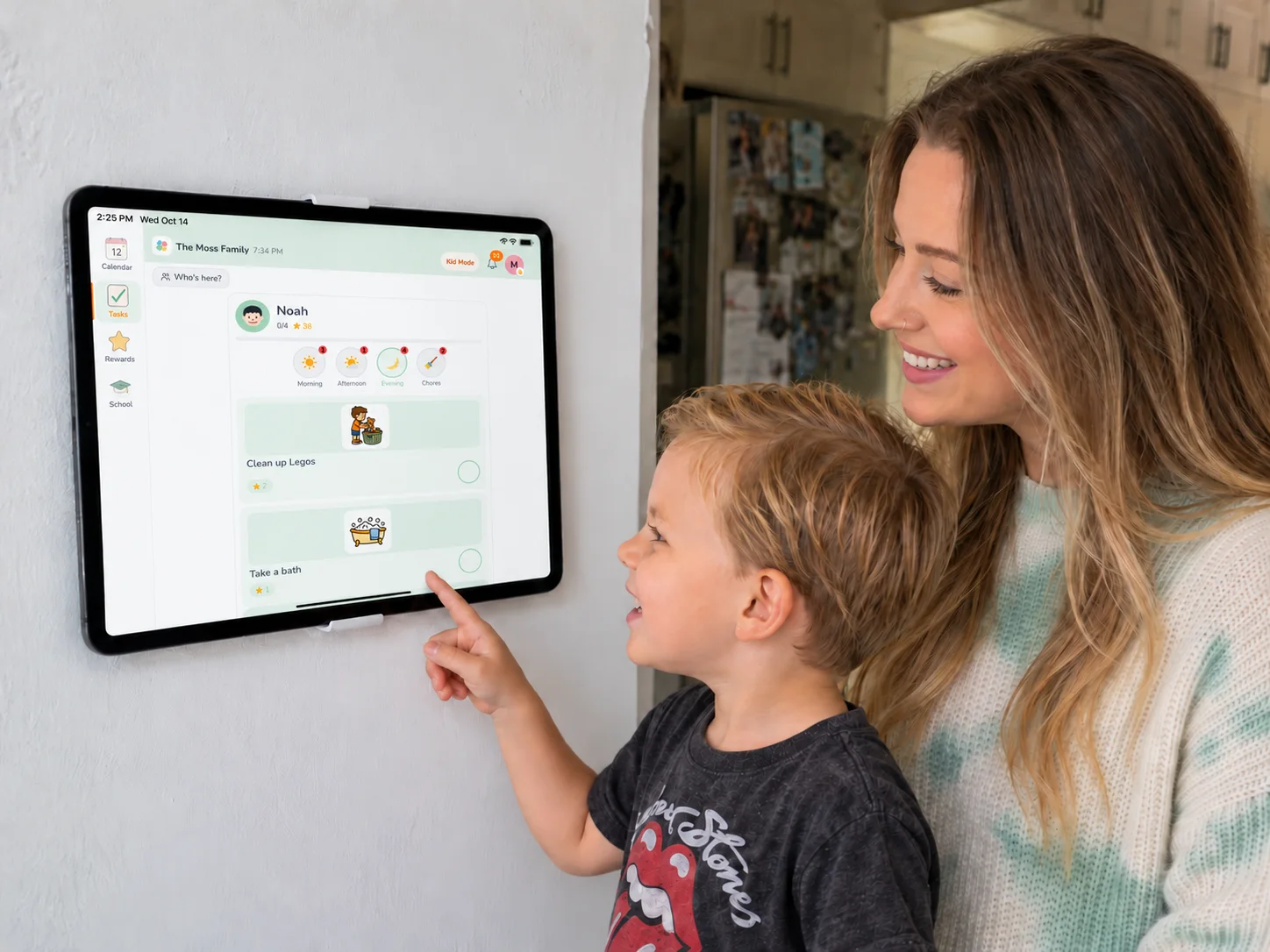
A Skylight Calendar is a touchscreen that hangs in the kitchen and shows the whole family's week. It's the best-known family wall calendar, and setup is simple. You plug it in, connect your calendars, and it works. It also costs about $300 before you've added a single event, and several of the features families buy it for sit behind a yearly subscription.
So it's worth knowing what else is out there. We should say up front that we make Poppycal, one of the alternatives below. We've tried to make this useful even if you don't pick us, and that includes saying when Skylight is the better choice.
Prices and features were checked on October 19, 2026. They change, so double-check before you buy.
What Skylight costs, and what you get
The 15-inch Skylight Calendar 2 is $299.99 and the 27-inch Calendar Max is $599.99. Out of the box you get a shared family calendar, color-coded profiles, chores and lists, and calendar sync with no subscription.
Calendar Plus is about $80 a year. That's where meal planning, rewards for chores, the photo screensaver and Magic Import (turning an emailed schedule or PDF into events) live. Skylight also now sells Skylight Assistant, an AI helper you text, for $119.99 a year with Calendar Plus included.
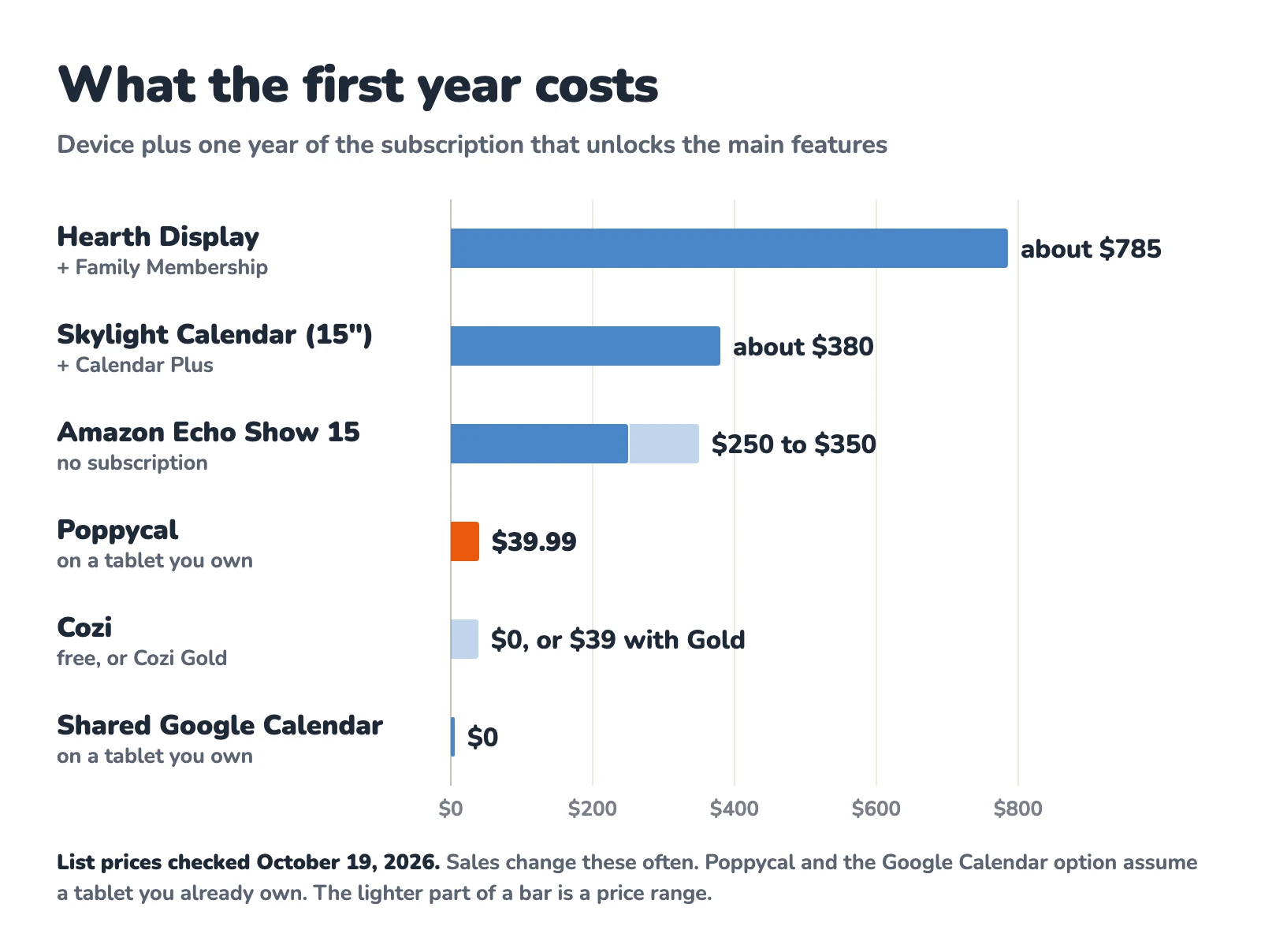
That puts the first year at roughly $380 for the 15-inch with Plus, then about $80 every year after.
There are two more things to know before you buy.
Skylight syncs both ways with Google and iCloud, so an event added on the frame shows up on your phone and the other way around. Outlook only syncs one way. Outlook events appear on Skylight, and changes made on Skylight stay on Skylight. If one parent lives in an Outlook work calendar, that matters.
For groceries, Skylight can send a list to Instacart from its phone app. Walmart+ ordering is listed as "In progress" on its public roadmap.
The alternatives at a glance
| Option | Upfront | Each year | Best for |
|---|---|---|---|
| Skylight Calendar | $299.99 (15") | about $80 for Plus | Plug-and-play, no tinkering |
| Poppycal on a tablet you own | $0 | $39.99 | Calendar, chores, meals and groceries in one app |
| Cozi | $0 | Free, or about $39 for Gold | Shared lists and a calendar on everyone's phone |
| Hearth Display | about $699 (often on sale) | $86.40 | A big, premium wall screen |
| Amazon Echo Show 15 | about $250 to $350 | $0 | Alexa homes that want a screen too |
| Shared Google Calendar on an old tablet | $0 | $0 | Just seeing the schedule, nothing more |
1. Skylight Calendar (the one to beat)
It's the easiest setup on this list. The screen is made for a wall and stays on, grandparents can figure it out, Google and iCloud sync both ways, and chores are included without a subscription.
The catches are the upfront price, the yearly Plus fee for meals and rewards, and Outlook syncing only one way.
It's the right pick if you want a dedicated screen you never have to think about and you don't have a spare tablet.
2. Poppycal on a tablet you already own (ours)
Poppycal is an app that runs on iPhone, iPad, Android and any web browser, so your family's "wall calendar" can be an old iPad in a stand on the counter, a cheap Android tablet on the wall, or just everyone's phones.
It's one price for the whole family, $4.99 a month or $39.99 a year, with everything included: the calendar, chores with stars and rewards the kids redeem, meal planning, recipes, and a grocery list you can send to Walmart or Instacart. It syncs both ways with Google, Apple and Outlook at the same time, so the Outlook parent and the Google parent both stay in their own calendars.
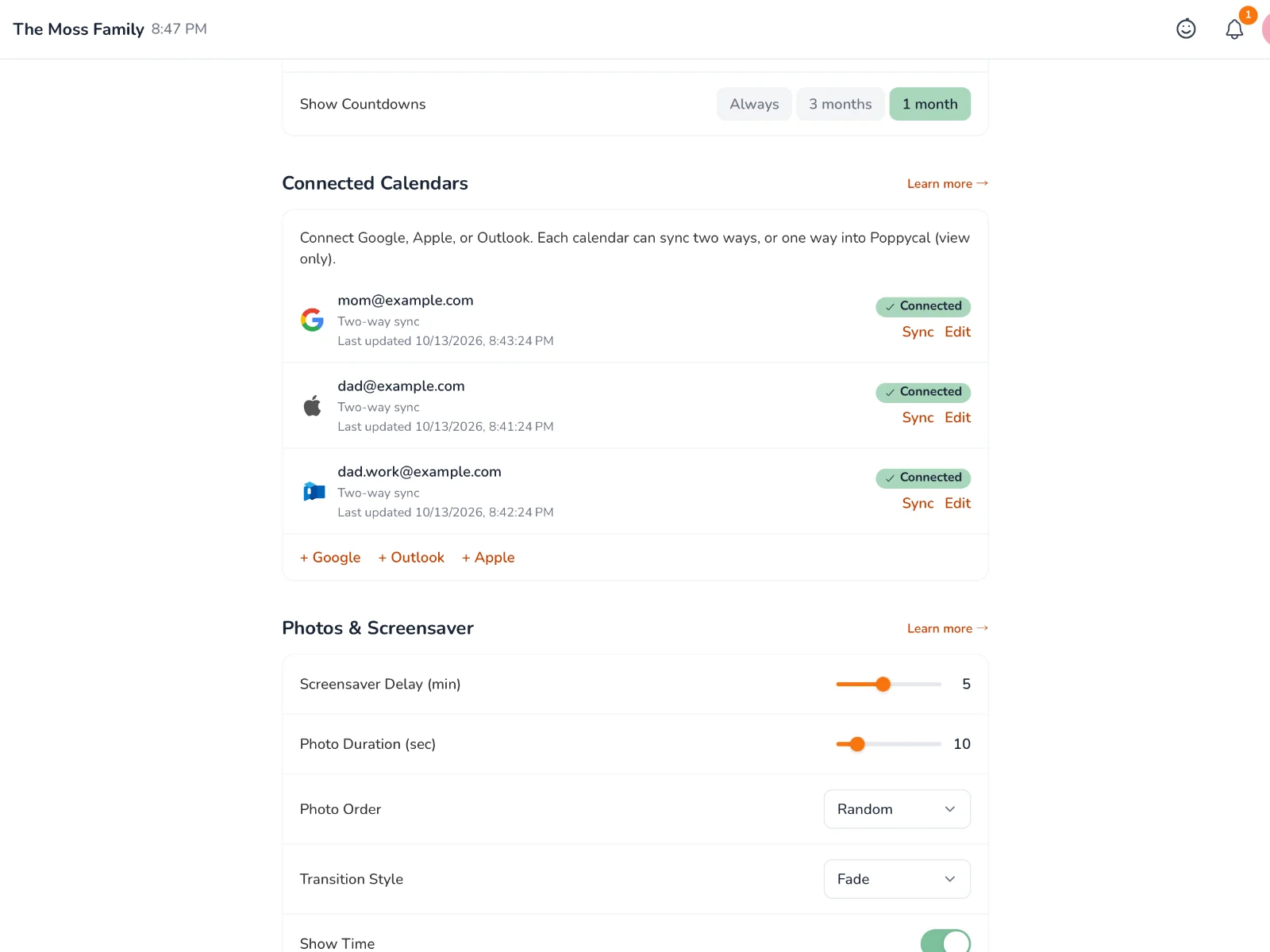
In Poppycal, Google, Apple and Outlook calendars can all sync both ways at once.
There's also Babysitter Mode (one link with the night's plan for the sitter) and a school planner for homeschool families. The free trial is 14 days with no credit card.
The tradeoff is that you need a tablet, and an old iPad on a stand isn't as polished as a screen built for the wall. You'll want to sort out a charger and keep it plugged in. We're also a small company, and there's no AI assistant.
It's the right pick if you have a tablet in a drawer, someone in the house uses Outlook, or you want meals and groceries in the same place as the calendar without a second subscription.
3. Cozi
Cozi has been around for years and lives on everyone's phone. The free version covers a shared calendar, shopping and to-do lists, and recipes. Cozi Gold, about $39 a year, removes the ads and adds extras like more reminders.
The free version shows ads and only keeps 30 days of calendar history. Other calendars come in read-only, so you can see your Google or Outlook events in Cozi but can't edit them there. There's no chore rewards system and no wall display of its own.
Cozi makes sense if your family mostly needs shared grocery lists and a calendar on phones, and you want to pay nothing.
4. Hearth Display
Hearth makes a premium wall screen. It's a big, sharp display made for the kitchen, with routines, to-dos and syncing with Google, iCloud and Outlook.
The hold-up is price. The display lists around $699 (it's often on sale for less), and the Family Membership that unlocks most of the features is $9 a month or $86.40 a year.
Go with Hearth if you want the nicest screen on the wall and the budget isn't the deciding factor.
5. Amazon Echo Show 15
Amazon's 15.6-inch smart display can hang on the wall or sit on a stand. There's no subscription, and it does a lot besides the calendar: Alexa, timers, music, video and smart home controls, plus a shared family calendar and to-do lists.
The calendar is one widget among many, though, and reviews often call it small and limited. Expect Amazon suggestions and ads on the screen. Prices bounce around a lot, so wait for a sale.
The Echo Show 15 fits best in an Alexa house where the calendar is a nice extra.
6. A shared Google Calendar on an old tablet
This one is free. Make a family Google Calendar, share it with everyone, and leave an old tablet open on the kitchen counter. Everyone already knows how Google Calendar works.
It's only a calendar, though. There are no chores, no meal plan and no grocery list, and tablets go to sleep or wander off unless you set them up for it.
That's plenty if all you need is to see the schedule.
How to choose
A few questions sort out most families:
- Do you have a spare tablet? If you do, you can skip the $300 to $700 for a screen.
- Does anyone live in Outlook? If so, look for two-way Outlook sync. Skylight only syncs Outlook one way.
- Is it the calendar, or everything? If you also want chores, meals and groceries in one place, compare what's included against what's behind a subscription.
- How much setup will you put up with? Skylight and Hearth are plug-and-play. A tablet takes a few minutes of setup.
Frequently asked questions
Does Skylight Calendar need a subscription?
It doesn't need one for the basics. The calendar, chores, lists and sync all work without it. Calendar Plus, about $80 a year, adds meal planning, rewards, the photo screensaver and Magic Import.
Can I use an old iPad as a family wall calendar?
You can. Any family calendar app that runs on iPad will work. Put it in a stand or a wall mount near an outlet, keep it plugged in, and set it not to lock. Poppycal also has a kid-safe mode, so little ones can check off chores without getting into the settings.
What's the cheapest Skylight alternative?
A shared Google Calendar on a tablet you already own is free. If you also want chores, meals and groceries, Cozi's free version and Poppycal ($39.99 a year) are the low-cost options.
Which family calendar works with Outlook?
Skylight, Cozi and Hearth all show Outlook events. Skylight's Outlook sync is one way and Cozi's is read-only. Poppycal syncs Outlook both ways, alongside Google and Apple.
Try it on the tablet in your drawer
If you've got an old iPad or Android tablet lying around, it might already be your family's wall calendar. You can try Poppycal free for 14 days, no credit card required, or take a tour of everything it does.
- family calendar
- family organization